Tuesday, March 1, 2022

Week of March 1st, 2022

Network Maintenance Weekend - March 6th, 2022

The first Sunday of EACH month is reserved for the IT Department to perform disruptive (but necessary) maintenance on our networks systems.  With 24/7 access to online resources for our staff and students, we have reserved the FIRST Sunday of each month to perform this work. Please note Sunday there will likely be disruption to various systems that may impact your access to: TTSD phone system, network resources (wifi), internet filter and Mac/iPad "Self Service"

New Staff Portal - March 7, 2022

A fresh new look and design is coming soon ~ to both the TTSD Employee Staff Portal and Infinite Visions Employee Access.


What does this mean to me? “Employee Portal” is becoming “Staff Portal” with a new look and feel.

  1. Staff Portal is an internal website for TTSD staff specifically to find District resources such as Quick Links, Forms, Departmental information and documents. Sneak Peak

  2. Staff Portal will have a link to “Employee Access” is where you will find confidential information all about YOU - your pay, official time off accruals, W2’s, address changes, etc.


When will all this happen?

Official Go-Live date for the Staff Portal is March 7, 2022.


What about Quick Links? I depend on them!

We hear you ~ we depend on them too. The new Staff Portal will continue to have Quick Links and more, with a fresh clean look and updated technology designed to help you find what you need more easily (like a functional search).

  • NOTE: You may need to update your links & bookmarks


Wednesday, February 9, 2022

Week of Feb 7, 2022

All TTSD Staff Users:
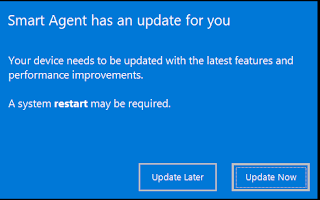
New LightSpeed Filter Automatic Update On Thursday Feb 10, 2022:

  • Users will see "Smart Agent has an update for you"
  • Please click "Update Now" when you are ready for you computer to install & restart.
  • NOTE: Computer will restart.


Elementary Standards Gradebook Refresher Virtual Training

  • Tuesday, February 15th @ 3pm
  • 100% optional, but will be very helpful for setting up your gradebook to easily post QT3 report card grades.


Tuesday, February 1, 2022

Week of January 31, 2022

 End of Term Tips & Guides  

Beginning of Term Tips & Guides 


Back Up Your TTSD Computer 

It's important for all TTSD staff to be responsible for their own files on their computer.  Technicians can help you set up a new computer and help with instructions on how to SET UP A BACKUP on your computer. But if the computer fails for any reason and it was NOT backed up, there isn't anything we can do to help you restore local files.  (The other option is to work out of Google Drive).


Wednesday, January 26, 2022

Week of January 24, 2022


Down Day Weekend - Sunday, January 30, 2022


Due to next weekend being a grading weekend (QT2), we will be performing the February work THIS weekend. 

The first Sunday of EACH month is reserved for the IT Department to perform disruptive (but necessary) maintenance on our networks systems.  With 24/7 access to online resources for our staff and students, we have reserved the FIRST Sunday of each month to perform this work.

Please note Sunday there will likely be disruption to various systems that may impact your access to: TTSD phone system, network resources (wifi), internet filter and Mac/iPad "Self Service"


iOS and MacOS Updates Approved for TTSD Devices


Updates for iPad iOS and Mac operating systems come out regularly towards the end of the calendar year.  TTSD Technicians test the new versions during the month of January, looking for any conflicts with TTSD software.  We have completed this test and found nothing significant to delay the updates for all TTSD staff and students.


We highly recommend all staff and students update their iPad to version 15.
Please see this KB Article for step by step:


The MacOS update to Monterey, version 12, for your laptops is optional.:

Highlights of each new version:


Wednesday, January 19, 2022

Week of January 18, 2022

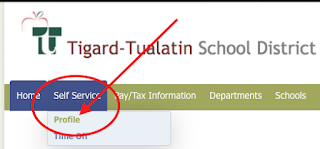
 All Staff: Make Sure Your Address is CORRECT in the Employee Portal :

  • Why?
    • Make sure your W2 is sent to the correct address
    • Prepare your TTSD account for the new Staff Portal (coming...March 2022)
  • When? 
    • ASAP (....was due Jan 14th for W2s)
http://portal.ttsd.k12.or.us >> Login
Self Service>> Profile 


Live Translated Captions in Google Meet
Live translated captions in Google Meet are now available mobie. Languages currently available are French, German, Portuguese, and Spanish


From Google…

    Monday, January 10, 2022

    Week of January 10, 2022

     Preparing & Practicing for Distance Learning with your Classroom 


    Tuesday, December 14, 2021

    Week of Dec 13th - WINTER BREAK

    WINTER BREAK STAFF NECESSARY UPDATES:

    TTSD's winter break runs Dec 18th through Jan 2nd and is an excellent opportunity to run some lengthy updates.  All staff with TTSD technology please perform the following during your break to ensure your technology devices are working optimally and are secure.  It is the TTSD staff member's responsibility to back up their work documents and run the latest updates on TTSD issued devices. You may take these steps anytime before mid January 2022.

    PLUG YOUR DEVICE INTO POWER BEFORE BEGINNING THE FOLLOWING...

    1.  Check that you are backing up important work files from your laptop/mobile device/s: 
      1. Computer Backup Instructions for laptops [could take a few minutes, up to a few hours]
      2. Instruction to Backup iPad Apps
    2. Run Operating System updates: [could take ~1 hour]
      1. Update macOS computer << Please NOTE Step #3, click MORE INFO....

    PRINTSHOP ORDERS:
      
    Our printshop staff will also be taking the Winter Break off for some well-deserved rest.  Please note print jobs submitted just before the break and/or during the break will begin being processed on January 3rd (with a 3-5 day turn around).  Thank you for your pre-planning and support of our print shop team. 

    TTSD TechBlog has moved to ParentSquare

    PLEASE NOTE: The TTSD TechBlog has moved to ParentSquare.  To sign up for updates, please click below to join the ParentSquare Group.   http...