Google has provided a FREE series of training modules specifically for classroom teachers. There are 5 full courses (see image below). The first course is called Fundamental Training. There are 13 Units in the Fundamentals Training program that are extremely relevant to the work we are doing at TTSD. Each unit within each course is broken down into 20-30 mini-lessons.
This is a GREAT way to learn how to use the amazing and vast resources we have with the Google Suite (Google Apps for Education). Use your TTSD login to sign in and when you have a moment in your day, walk through one of the lessons. Let's get started!
Welcome to the TTSD IT Department blog (aka "techblog"). As a department, we strive to provide excellent support and communication throughout our District. Please check here for updates on current events related to technology support @ TTSD.
Saturday, December 16, 2017
Thank you TOSAs for our Holiday Tech T-Shirts!
Happy Holidays to all! Enjoy your time with family and friends...and maybe take a few moments to checkout some new ideas for integrating technology tools into your lessons!
Monday, November 27, 2017
TEACHERS & ADMINS: Please enroll your Mac computers
Teachers & Administrators:
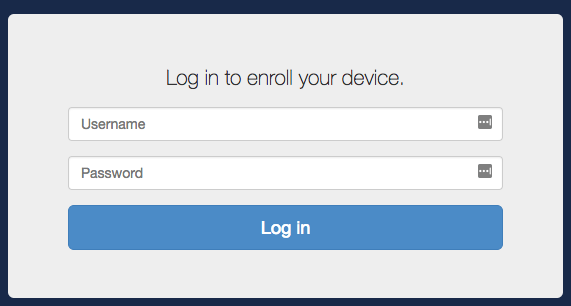
Within the next 2 weeks (by Dec 8th), please take ~10 min AT WORK (on TTSD network) to follow the directions below which will enroll your computer the JAMF management system. This new system will allow you to install updated apps like MS Office and will be required to access secure websites in the future.
- Follow the directions below or click KNOWLEDGEBASE ARTICLE to open in a new window.
- You will see a message stating "The Enrollment Process is complete" when successful.
- You will also find a new application called "Self Service" in your Applications folder.
Wednesday, November 1, 2017
Netop Fix - Filter Web
Netop fixed a bug in the Filter Web feature.Previously we found that if your website had a hyphen in the URL (like GradPoint: https://ttsd2295-ttoa-ccl.gradpoint.com/Welcome.vp/page.htm), the Netop Filter Web would continue to BLOCK the site, even if you entered "gradpoint.com" in your allow list found in the Filter Web text file.
This bug has now been resolved. Sites with hyphens in the URL will now be allowed, if the domain (or full site) was added to the Filter Web text file and enabled.
Wednesday, October 25, 2017
Please Take the National Speak Up Survey 2017
- Learning and teaching with mobile devices, digital content, gaming, videos, and virtual & augmented reality
- Internet access at home and in school
- Importance of math and best ways to learn math
- Digital citizenship
- And, much more!
Surveys take less than 20 minutes to complete and are completely anonymous. Join more than 500,000 people from more than 10,000 schools to be sure your voice is heard this year!Speak Up is both a national research project and a FREE service to schools and districts, brought to you by Project Tomorrow. When/if prompted, please use "ttsd" for district code.
Monday, October 23, 2017
App updates after iOS 11 upgrade
Apps such as Keynotes, Pages and Numbers will require an update after iOS 11 upgrade. If your staff and/or students cannot open these apps or any other apps after iOS 11 upgrade, please find the app in Self Service and click Reinstall.
Thursday, October 19, 2017
STUDENT iPads & iOS 11 -- scheduled by school
We are ready to begin a strategic process for updating STUDENT iPads to iOS 11 that are eligible (purchased within the last ~3 years). We will be remotely updating student devices beginning after school, based on the following schedule:- October 19: Rider & Byrom
- October 20: Bridgeport & Deer Creek
- Weekend: Middle School students
- October 23: Metzger & Woodward
- October 24: Templeton, Durham & Tualatin
- October 26th and 27th (conference/training dates): any remaining devices not at iOS 11
Upon successful update to iOS 11, students iPads will display the "Update Complete" screen. Click "Continue" (3 times) and then "Get Started."
Tips for iOS 11:
Subscribe to:
Posts (Atom)
TTSD TechBlog has moved to ParentSquare
PLEASE NOTE: The TTSD TechBlog has moved to ParentSquare. To sign up for updates, please click below to join the ParentSquare Group. http...
-
We have recently increased the security of a few of our web sites, one of which was the Print Shop . During the upgrade we removed access ...
-
Thank you for your patience in waiting to upgrade your iPad to the new operating system, iOS 11. We are READY for staff and teac...
-
We are ready to begin a strategic process for updating STUDENT iPads to iOS 11 that are eligible (purchased within the last ~3 years). We w...