Tuesday, August 22, 2023

Week of August 21, 2023 - Summer Update #3 / Welcome Back Teachers!

WELCOME BACK TEACHERS!  It's going to be a great year! Please find some important updates below for this new school year:


PK-12 Teachers:
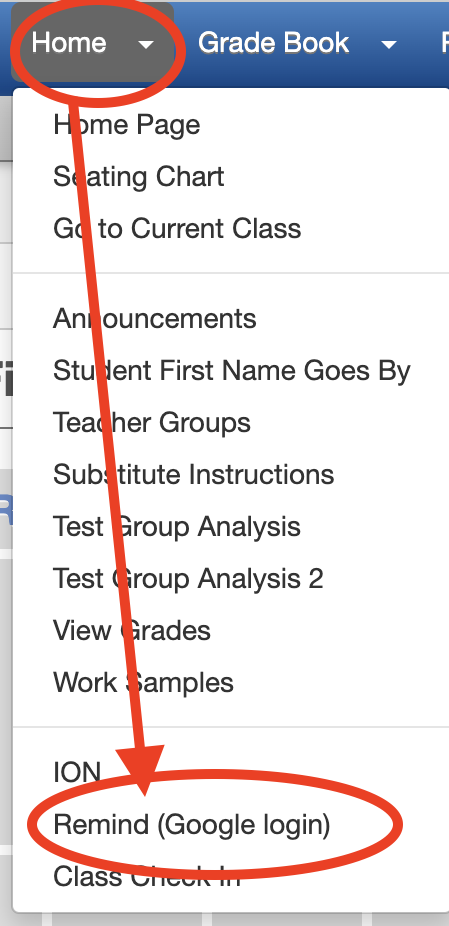
Remind is now integrated into the Synergy TeacherVUE "Home" menu for easy school to home communication (Replacing "Communication").  Remind already has your classes rostered and when you select to "translate" your message, parents and students will receive your message in their home language via text or email (or App) without having to sign up.  Additionally, when they respond in their home language, it will translate BACK into your preferred language. (Use your Google login for Remind.)


AppleTVs are now TTSD Classroom Standard: 


Digital Citizenship Lessons are necessary for ALL AGES
Our students are navigating a time where honed technology skills are essential to their future.  Please take time through the school year, beginning in the first weeks, to review the responsibilities that come with using these tools responsibly and learning these skills to open opportunities. Topics to explicitly discuss are:
  • Online bullying (including cyberbullying)
  • Responsible use of social networking
  • Digital health (screen time in moderation)
  • Digital literacy - deciphering real vs fake information online
As we all explore the new technologies, like Artificial Intelligence (AI) (see TTSD's AI committee Pros/Cons Spring 2023), we all deserve an opportunity to learn about these tools in a safe and thoughtful way.  Please look for to additional opportunities this fall to learn about AI @ TTSD.  

Need some suggestions on how to bring this topics into your specific grade level?  Please see Seesaw digital lessons scope & sequence (link to Seesaw Computer Science lesson library) for age appropriate, lesson plans and activities for students in elementary school.  For secondary students, please see Common Sense Media for ideas or specific lessons that will resonate with your students.


Elementary School Updates

  • STUDENT iPad APP LIST: The amount of Apps available for students has been streamlined and prioritized for use in the classroom.  Thank you for your participation in the Spring app survey sent to all ES and MS teachers.  Based on your feedback of valuable classroom apps, there is now a list of refined apps available to students.  See 2023-24 Fall iOS Student App List.  
  • YouTube.com will initially be blocked on all PK-5 student iPads.  
    • Please begin the year with digital citizenship lessons and activities with your students to ensure they are given the opportunity to make informed decisions with their technology use. 
    • Then, if your grade level team would like to use the YouTube resources in your classrooms for instruction, please just submit a Tech Request. 

================================================

Don't miss previous Summer Updates:

  • Summer Update #1 - How to print securely in your school, using "SecureCopy Papercut" printer.
  • Summer Update #2:
    • Timeline for teachers, parents and students to access Parent/StudentVUE and Canvas
    • How to check out a document camera


Monday, August 14, 2023

Week of August 14, 2023 - Summer Update #2 / Welcome Back Secretaries!


Summer Update #2


Timeline for Synergy, Canvas & Clever


How to Check Out a Projector or Document Camera 
  • Beginning Fall 2023, all TTSD Classrooms should now have a mounted projection system (either a mounted projector or classroom display mounted on the wall).  
    • Apple TVs are also now a classroom standard and should be available in every TTSD classroom.
  • With this, document cameras and unmounted projectors are optional devices available for a teacher to check out.  To check out one of these devices for the school year, use the service request form(s)
    below:


Wednesday, July 5, 2023

Week of July 3, 2023


Summer Update #1:

This summer we will be implementing Papercut across all district copiers. This initiative aims to address the issue of secure & flexible printing to school copiers. 

One of the notable advantages of Papercut is its seamless integration across our district. With this implementation, you will gain the ability to print to any Papercut enabled copier without the need to install additional copiers/software drivers. 

Papercut is already enabled on your device, so there are no further steps you need to take, and we will let you know when it is available at your school's copy machine.

For detailed instructions on how to print to the copier using Papercut and how to log in at the copier, please refer to the links provided below.

Print to PaperCut Copiers (from your laptop)
Papercut Sign In (at the copier)
Thank you for your cooperation and support as we introduce Papercut as our new printing solution. We are confident that this implementation will bring significant benefits to our district, promoting sustainability and improving printing efficiency.


Wednesday, June 14, 2023

Week of June 12th

 End of Year Wrap Up:

What a great year we have had again together.  As you pack up your classrooms and begin transitioning to summer break, the IT Department wanted to make sure you had a few Quick Tips to end the year with your technology and accounts (and maybe some summer projects):
  1. Year End Check List for Staff
  2. Important Dates:

    1. June 20th, (Tuesday): Phone system maintenance
    2. July 17th, (Monday): Synergy will be set to 2023-24 school year
      1. Blackboard & a few other systems will be available with new year
    3. August 18th, (Friday): Last day for schedules to be "pushed out" in Synergy
    4. August 19th, (Saturday): First day Canvas, Clever, Seesaw, Remind will have Fall 2023 classes and students loaded for staff and teachers to view.
    5. Other digital resources/curriculum Beginning of School Year Software & App "Ready Dates"
      1. Canvas courses will be available for teachers August 21, 2023 (Monday)


Digital Resources for Summer Learning

Resources for Summer Learning: 😜


Thursday, June 1, 2023

Week of June 1, 2023


June ANNOUNCEMENTS


DOWN DAY WEEKEND - SUNDAY, JUNE 4, 2022

The first Sunday of EACH month is reserved for the IT Department to perform disruptive (but necessary) maintenance on our networks systems.  With 24/7 access to online resources for our staff and students, we have reserved the FIRST Sunday of each month to perform this work.

Please note Sunday there will likely be disruption to various systems that may impact your access to: TTSD accounts, network resources (wifi), internet filter and Mac/iPad "Self Service"

Thursday, May 4, 2023

Week of May 1, 2023

 DOWN DAY WEEKEND - SUNDAY, MAY 7, 2022

The first Sunday of EACH month is reserved for the IT Department to perform disruptive (but necessary) maintenance on our networks systems.  With 24/7 access to online resources for our staff and students, we have reserved the FIRST Sunday of each month to perform this work.

Please note Sunday there will likely be disruption to various systems that may impact your access to: TTSD accounts, network resources (wifi), internet filter and Mac/iPad "Self Service"


APPLE TVs will be the classroom standard, beginning fall 2023 
 
Beginning Fall 2023, all TTSD classrooms will include an Apple TV as part of a standard classroom "setup."  IT and T&L will provide support and training on how to connect to the Apple TVs from your teacher device (and student devices) as well as how to integrate these into your instruction.  Additionally, the IT department is working to identify a district solution to remove projectors on carts for the remaining classrooms.  Three CFT classrooms are piloting three different mounted display options.  Please watch for additional information both on the technology blog and for ES and MS in the form of a feedback survey in a few weeks.


All TTSD Classrooms beginning Fall 2023!


Friday, March 3, 2023

Week of March 1st


 AUTO-TRANSLATED sCHOOL <> hOME cOMMUNICATION

Did you know?.....

  • Remind is a PAID resource available for all TTSD staff (teachers, FPAs, coaches, club advisors, etc.) to be used for classroom/group communication.
  • Remind is a communication tool available to ALL CLASSROOM teachers
    • Remind is automatically set up with your classroom roster(s) from Synergy
  • Remind is accessible through Clever, using your Google Login.
  • Remind uses the students "correspondence language" in Synergy to auto-translate messages to their preferred language when you send your message in English (or any language) -- WITH NO EXTRA STEPS
  • Families can RESPOND to your messages in their preferred language and it AUTO translates to your preferred language (by default staff preferred language = English)
  • For students over 13 yrs old, Remind is set to use the student's cell phone (in Synergy) to send/receive text messages.
HELPFUL ("KB") ARTICLES ON USING REMIND @ TTSD.


 DOWN DAY WEEKEND - SUNDAY, March 5, 2022

The first Sunday of EACH month is reserved for the IT Department to perform disruptive (but necessary) maintenance on our networks systems.  With 24/7 access to online resources for our staff and students, we have reserved the FIRST Sunday of each month to perform this work.

Please note Sunday there will likely be disruption to various systems that may impact your access to: TTSD accounts, network resources (wifi), internet filter and Mac/iPad "Self Service"


"KB" = TTSD Knowledgebase (http://kb.ttsd.k12.or.us)


TTSD TechBlog has moved to ParentSquare

PLEASE NOTE: The TTSD TechBlog has moved to ParentSquare.  To sign up for updates, please click below to join the ParentSquare Group.   http...