Wednesday, April 20, 2022

Week of April 18th

New Synergy Tool for Secondary Level Teachers - "Student Profile"


  • From the TeacherVUE seating chart view, click on any student & select "Student Profile" from the list. A dashboard of data about the selected student will appear, including the following data:
    • Attendance
    • Discipline
    • Course History/Graduation credits
    • Test History
    • Health concerns


Cyber Security Awareness @ TTSD


  • Why Cyber Security?
    • Data protection
    • personal privacy
    • student/staff safety
    • business operations (ie payroll)
  • How?
    • phishing scams (email)
    • SMS/text message
    • phone calls
    • Internet/Web "hacks"
    • Computer compromise = Ransomware
  • TTSD Response to Improve Cyber Security (a few...):
    • Multi-factor authentication on staff Google accounts
    • Improve security access to servers/systems
    • Remove local administrative rights on user/staff computers
    • EDUCATION
  • Spring Cyber Security Training for ALL Staff can self-enroll in the course HERE: https://ttsd.instructure.com/enroll/NHFETL (to get a jump-start)
    • You can also wait to be invited to the Canvas course at the end of April 2022.


Friday, April 1, 2022

Week of March 28th

 Admin By Request

Beginning April 2022, TTSD will slowly be implementing a new security setting on TTSD laptops and computers.  
    • WHY: 
      • Most cyber scams and security scams are successful because when they reach the computer, they have FULL rights to run any program they want - there is NO granting o permission required by the user.
      • Our cybersecurity insurance policy requires that our computer "end users" are not administrators in order to protect the district from cyber crime ($).
    • WHAT:
      • What this means for all TTSD staff is eventually, you will need to request permission to install an application that is not found in Self Service in your Mac "Applications" folder.
    • WHEN:
      • This new security precaution will be rolling out slowly beginning with the new teacher computer replacements in April 2022 and should be completed by the end of the calendar year. 


Down Day Weekend - Sunday, April 3, 2022


The first Sunday of EACH month is reserved for the IT Department to perform disruptive (but necessary) maintenance on our networks systems.  With 24/7 access to online resources for our staff and students, we have reserved the FIRST Sunday of each month to perform this work.

Please note Sunday there will likely be disruption to various systems that may impact your access to: TTSD phone system, network resources (wifi), internet filter and Mac/iPad "Self Service"


Wednesday, March 16, 2022

Week of March 14 2022

Computer replacement for licensed staff coming soon...

  • All licensed staff computers will be replaced this spring - beginning soon after spring break.
  • Please make sure during spring break you have prepared your TTSD computer to be swapped out.  STEPS TO BACK UP YOUR COMPUTER
  • Your computer will need to be backed up before we can swap it out for a new one.


DIAL 8 FOR AN OUTSIDE LINE - Beginning March 21st

"Due to the number of accidental 9-1-1 calls on our district phones over the years, TTSD will be moving to a "DIAL 8 for an outside line" system March 20th (Spring Break) on ALL DISTRICT PHONES.  Beginning Monday, March 21st, ALL district phones (including Jabber) will require users to DIAL 8 to get an outside line, and then enter the phone number.  

Examples:
  • Local call = 8, 503-555-5555
  • Long Distance = 8, 1-612-555-5555
  • TTSD Extension = 4051. [no "8" if using just the district 4 digit extension]
NOTE: Dialing 9-1-1 will continue to work in the case of an emergency (Dial 9,1,1 --- NO DIAL 8 necessary) 


Wednesday, March 9, 2022

Happy Classified Employees' Week!


THANK YOU to all of our classified employees - this week and all year long!


Please take a moment to say a sincere "Thank you!" to at least 2 classified staff each day this week!


All TTSD Employees, please review the following guidelines 

  • Key elements: 
    • NEVER share your password with anyone (other staff, subs, etc) [Change Password instructions]
    • If electronic communication regarding a student is necessary, users will send ONLY the student’s ID number and initials for identification.

  • Key elements: 
    • All official TTSD school or District social media sites will be communicated to the Communications Department.
    • Remember that online posts and content are an extension of your classroom or the workplace.  
    • Long-term (24hrs+) storage of student and staff data:
      • Is permitted on TTSD file servers
      • Is permitted TTSD (only) Google apps for education domains - TTSD or TTSDSTUDENT (no personal Google accounts)
      • Is not permitted on mobile device (ie laptop) local drives 
      Is not permitted on flash drives
  • Key elements: 
    • Any loss or damage due to theft, burglary or vandalism must be reported to both the police and the IT department via a Tech Request (include TTSD Tag number) by the next business day.
    • TTSD equipment is not intended for personal use (including personal photo storage)

Internet Filter Rules by Grade Level 

  • Key elements: 
    • List of topic categories blocked
    • If you find a site is blocked but mis-categorized, please submit a Tech Request with the URL in question.


Tuesday, March 1, 2022

Week of March 1st, 2022

Network Maintenance Weekend - March 6th, 2022

The first Sunday of EACH month is reserved for the IT Department to perform disruptive (but necessary) maintenance on our networks systems.  With 24/7 access to online resources for our staff and students, we have reserved the FIRST Sunday of each month to perform this work. Please note Sunday there will likely be disruption to various systems that may impact your access to: TTSD phone system, network resources (wifi), internet filter and Mac/iPad "Self Service"

New Staff Portal - March 7, 2022

A fresh new look and design is coming soon ~ to both the TTSD Employee Staff Portal and Infinite Visions Employee Access.


What does this mean to me? “Employee Portal” is becoming “Staff Portal” with a new look and feel.

  1. Staff Portal is an internal website for TTSD staff specifically to find District resources such as Quick Links, Forms, Departmental information and documents. Sneak Peak

  2. Staff Portal will have a link to “Employee Access” is where you will find confidential information all about YOU - your pay, official time off accruals, W2’s, address changes, etc.


When will all this happen?

Official Go-Live date for the Staff Portal is March 7, 2022.


What about Quick Links? I depend on them!

We hear you ~ we depend on them too. The new Staff Portal will continue to have Quick Links and more, with a fresh clean look and updated technology designed to help you find what you need more easily (like a functional search).

  • NOTE: You may need to update your links & bookmarks


Wednesday, February 9, 2022

Week of Feb 7, 2022

All TTSD Staff Users:
New LightSpeed Filter Automatic Update On Thursday Feb 10, 2022:

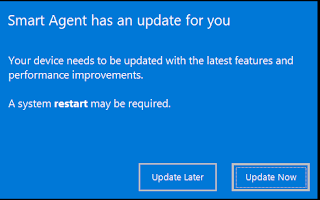
  • Users will see "Smart Agent has an update for you"
  • Please click "Update Now" when you are ready for you computer to install & restart.
  • NOTE: Computer will restart.


Elementary Standards Gradebook Refresher Virtual Training

  • Tuesday, February 15th @ 3pm
  • 100% optional, but will be very helpful for setting up your gradebook to easily post QT3 report card grades.


Tuesday, February 1, 2022

Week of January 31, 2022

 End of Term Tips & Guides  

Beginning of Term Tips & Guides 


Back Up Your TTSD Computer 

It's important for all TTSD staff to be responsible for their own files on their computer.  Technicians can help you set up a new computer and help with instructions on how to SET UP A BACKUP on your computer. But if the computer fails for any reason and it was NOT backed up, there isn't anything we can do to help you restore local files.  (The other option is to work out of Google Drive).


TTSD TechBlog has moved to ParentSquare

PLEASE NOTE: The TTSD TechBlog has moved to ParentSquare.  To sign up for updates, please click below to join the ParentSquare Group.   http...