Wednesday, December 8, 2021

Week of December 6th

Where Should I Go to Learn of Wide-Spread Technology Issues at TTSD?

  • At times, we may experience wide-spread technical hiccups.  As soon as the IT Department knows and confirms the outage, the first place staff (and students) should check is the Announcements on the TTSD Ticket System
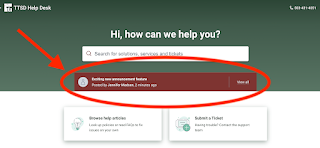
                                     

Examples may include - Canvas outage, Synergy outage, Google slowness, Amazon Web Service outage (like this week) - impacting logins to various TTSD systems, etc.


F = NG in Synergy Overall Grade

Per TTSD grading guidance for 2021-22 school year (see October 2021 communication from T&L below), we have adjusted the Synergy Report Card Score Type of Genesis grading to reflect this adjustment.  If you are using this score type in your gradebook (it's the default), you may notice your F's have automatically be adjusted to "NG"

Middle School Grade/Reporting Communication 

The below guidance was in play for quarter one, but will be extended for the remainder of the 2021-22 school year as we continue to experience COVID specific issues with quarantining and flexing instructional models/plans for many of our students, which has brought with it continued learning on the part of our parents, students, and teachers in dealing with health and protocol related issues.

Because students and teachers have had to continue to adjust to current in-person protocols, routines and systems changes, grades for the 21-22 school year are reflective of learning outcomes in the following way:  

Grades will be provided as indicated by an A, B, C, D  or NG (No Grade).  If a student receives an NG, it must be followed up with a comment with further explanation as to what the NG means/represents.
  • This decision allows for student progress to be shared by letter grades already established and with the understanding that the adjustments are necessary due to COVID related protocols impacting students at all levels.
  • F's can be defeating for students initially with the unpredictable shifts in delivery of instruction that can and have occurred. Given the many variables that continue to be beyond our control at this time, we will continue this year in issuing NGs (No Grade) with comments when necessary and continue to reflect learning outcomes using grades of A, B, C or D.

Friday, December 3, 2021

Week of November 29, 2021

Embedded Videos on iPads, Slow Internet, Google Timeout & Filter Errors

  • Two known issues we are facing with our new Internet filter (LightSpeed):
    1. EMBEDDED video links to either YouTube or Google Drive will not work on iPads.  Many teachers have streamlined their presentations with embedded videos in their Google Slides or on a Canvas page.  Unfortunately, the security settings we need on LightSpeed are preventing these from playing on student iPads.  Please place a DIRECT LINK to the video rather than embedding it for your K-8the grade students.
    2. Computers (laptops, desktops -- not Chromebooks or iPads) are experiencing slowness, website/Google drive "offline," and some wifi disconnects. We are working closely with the vendor to remedy this issue. Restarting your computer often temporarily fixes the issue. If you are experiencing this issue, please share your experience in this ONE question survey
feedback


Down Day Weekend - 1st Weekend in December

The first Sunday of EACH month is reserved for the IT Department to perform disruptive (but necessary) maintenance on our networks systems.  With 24/7 access to online resources for our staff and students, we have reserved the FIRST Sunday of each month to perform this work.

Please note Sunday there will likely be disruption to various systems that may impact your access to: TTSD phone system, network resources (wifi), internet filter and Mac/iPad "Self Service"

Thursday, November 18, 2021

Week of November 15, 2021

2021-22 Grading Periods:

  
In Canvas, teachers can choose to view assignments by individual grading period OR all grading periods, by: 
  1. Open course card
  2. Go to "Grades" menu
  3. Click View >> Filter >> Grading Periods

  4. Choose which grading period you want from the  NEW dropdown menu in the upper right corner

(NOTE: if assignments do not have any due dates, the last grading period will be automatically assigned. ** If you are "missing" assignments, please turn on your Grading Period filters (directions above))


Thursday, November 4, 2021

Week of November 1, 2021

 Secondary Teachers: Canvas and Synergy

Last year we introduced Canvas as the TTSD LMS, due to its ability to manage more online learning needs . These features included: integration with 3rd party apps, a fully functional grade book, parent interface, and the potential sync to Synergy to ease in grade posting and transfer to Synergy to name a few.  Additionally, ur new MTSS system (iON) is able to pull grade book assignments and grades from Synergy to help us identify students who are in need of additional support, saving our staff countless hours data mining systems to create adhoc reports for weekly meetings. 

It's been a stressful start to the Fall 2021 school year, and I want to acknowledge quite a few things have changed since we left TTSD schools in March 2020.  As we try to settle into this school year and embrace all that it has to offer, I'm very aware that some of the systems setup was just "too much" for many at the beginning of the year.  

Conferences last week were a great opportunity for us to view our setup from parents perspective. We have found it's important to "regroup" and ensure Canvas is set up to communicate well with students and parents.  So, we have created TWO helpful knowledgebase (KB) articles to help our teachers review their Canvas setup so it syncs seamlessly with Synergy (and therefore with the MTSS system and displays an overall course grade for student/parents).

Highlights for Teachers:

  • Use Canvas gradebook exclusively for all of your class assignments (digital or paper/pencil or participation points)
  • Match your Assignment Groups in Canvas with your Assignment categories in Synergy grade book
  • Double check the assignments you want to sync are in sync
    • by either comparing your Grades in Canvas with the Synergy gradebook
    • or an alternate way is to ask a student to show you both views from their perspective (this will help you see how it appears to students and parents)
  • Set up your Canvas course card to "nightly sync" with Synergy
  • Review the KB articles for tips and tricks on grade passback (Canvas > Synergy).

2021-22 Canvas Course Setup Checklist - Secondary Teachers


 Elementary Teachers: Canvas and Seesaw

As many of you complete your Canvas course card setup, we have heard that some teachers are enjoying the use of SeeSaw with younger students.  To create an EASY link from Canvas to SeeSaw, you can download the following SeeSaw image and use the CRAZY long link to link the image directly to SeeSaw (magically without having to go through Clever app first):

CRAZY Link:  
https://clever.com/oauth/instant-login?client_id=1a3bcfced3726d93850d&district_id=5716acf32ccd5401000004bc

IMAGE:


Wednesday, October 27, 2021

Week of October 25, 2021

 Technology-Related Reminders for this Week:

  • Oct. is Cyber Security awareness month.  Two requirements:
  • Quarter 1 Grading is around the corner (November 12th is Grading Day):
    • Elementary staff to complete Academic Feedback Form (instructions) and post to Canvas InBox for families to receive
    • Secondary staff to post grades in Synergy to be printed on Qt1 Report Cards (instructions), which will be posted to ParentVUE for families to receive

Technology Need to Know Updates:

  • Please do NOT update to iOS 15 or macOS Monterey. These OSes are not supported by LightSpeed yet. (our new internet filter)
  • Mac users were impacted by a district-wide (3000+ computers) internet filter software updated on Wednesday around 2:30pm.  Reinstalling LightSpeed from Self Service and restarting resolves this issue.  

Canvas Grade Passback:

  • GREAT NEWS - Gradebook nightly sync is now available (KB article for details)
  • Known "Gotchas" as a Reminder:
    • Canvas "do not count towards final grade" setting on assignment does NOT transfer to "not for grading in Synergy gradebook:
      • SOLUTION: do not sync this assignment
    • Canvas "Missing" status on assignment does NOT currently set the MI (missing) comment in Synergy.
      • SOLUTION: View missing individual assignment status in Canvas

Thursday, October 21, 2021

Technology Update - Week of Oct 18, 2021


TTSD Filter Update = "Update Now"


You may notice a Smart Agent update on your Mac computers, if. you see the following, please DO click "Update Now." The update will take place in the background...


Canvas Release Notes (2021-10-16)

Additional Details, see the 2021-10-16 Community Tag

New Features

  • Navigation: Sticky Navigation Menus
  • SpeedGrader: Submission Status Label Edits

Updated Features

  • Gradebook: Assignment Search
  • Notifications: Course Notification Customization

Feature Previews

  • Rich Content Editor: Accessibility Checker Indicator Default Setting Adjustment


Wednesday, October 6, 2021

October is CYBER SECURITY AWARENESS MONTH

 Cyber Security Training for all TTSD Staff - Complete by Oct 29, 2021

Take the Training

Cyber security awareness is now critically important for both your personal and staff/student safety and wellness. In this 15 training, you will find valuable and entertaining information on how to protect personal information and why TTSD is implementing Multi-Factor Authentication on all staff Google Accounts by November 1st.  (KB article for help on Muti-Factor Authentication setup)

Cyber Security Training includes:
  • Best Practices
  • Data Security
  • Ransomware

Below is a funny reminder that nothing on the internet is really free. Free content is usually supported by advertising, and the more advertisers know about customers the better they can target advertisements effectively. Your personal information itself is a BIG money game in the world of advertising and online sales!


TTSD TechBlog has moved to ParentSquare

PLEASE NOTE: The TTSD TechBlog has moved to ParentSquare.  To sign up for updates, please click below to join the ParentSquare Group.   http...